
# 非 uni-app 项目使用支付插件
插件支持非 uni-app 项目中使用,此时需要放弃前端组件 <vk-uni-pay></vk-uni-pay>,直接使用 http 请求方式请求云函数 url 化的接口地址,拿到支付参数后直接发起支付,具体操作如下。
# 获取 vk-pay 云函数的 url 化地址
进入空间详情页,点击云函数,点击 vk-pay 云函数的详情按钮,如下图所示。
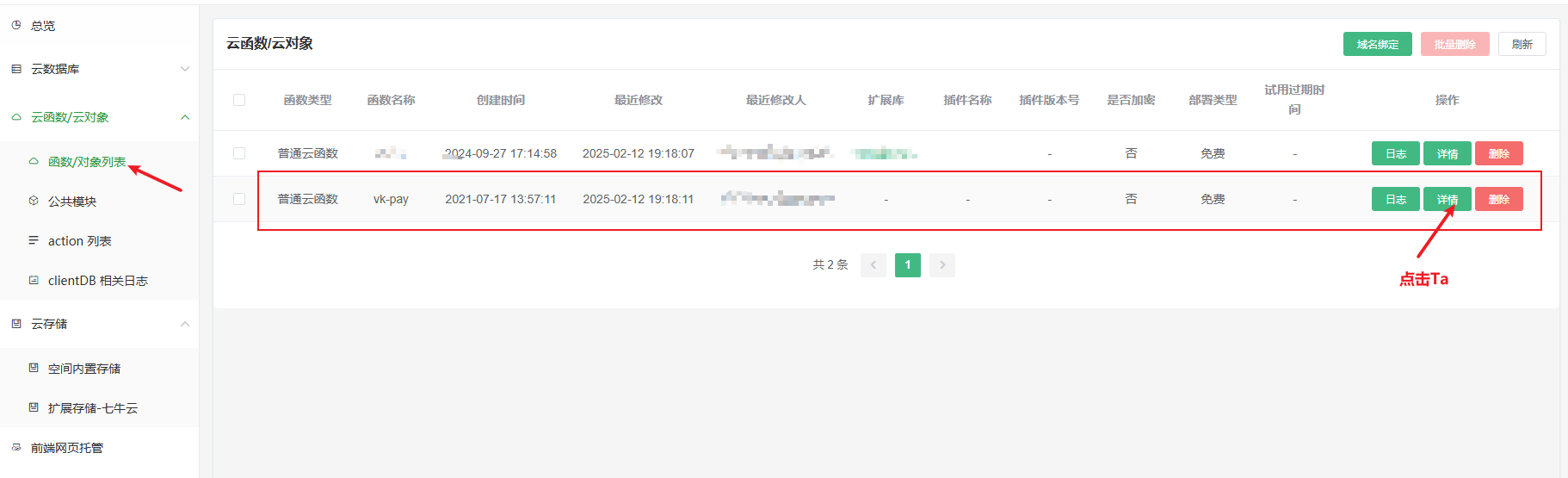
然后点击复制按钮,如下图所示。这就是云函数 url 化的接口地址
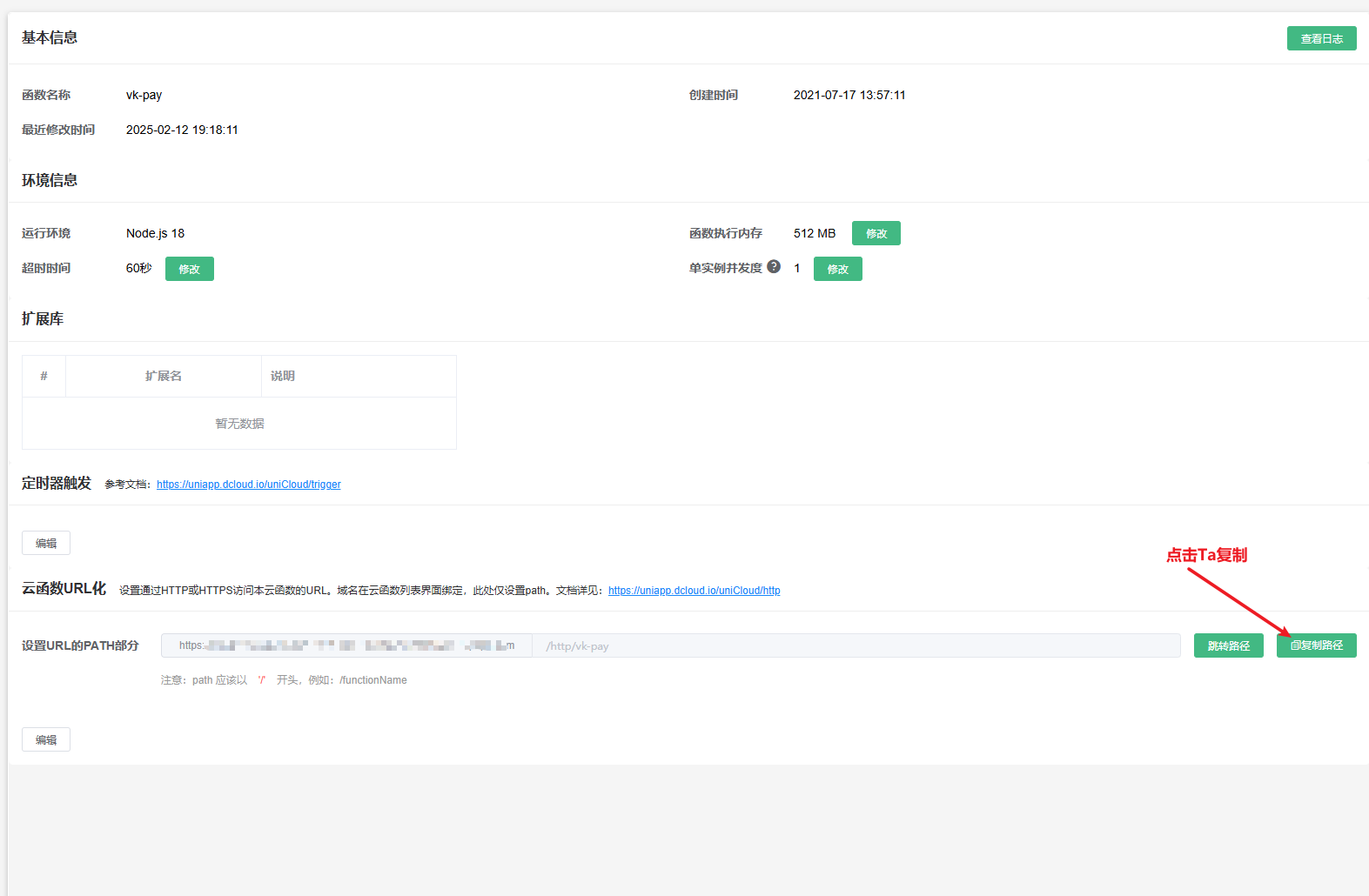
拿到地址后,通过下面的代码可访问支付接口。
# PC 扫码支付
# jquery 请求
$.ajax({
  type: 'POST',
  url: 'https://xxx.com/http/vk-pay', // 请替换为你的url化地址
  headers: {
    'content-type': 'application/json;charset=utf8',
  },
  data: JSON.stringify({
    action: 'pay/createPayment',
    data: {
      vk_platform: 'h5', // 这里固定 h5
      isPC: true, // 是否是电脑扫码支付
      needQRcode: 'image', // "image" 代表直接返回二维码图片,true代表返回二维码链接地址
      provider: 'alipay', // wxpay 微信支付 alipay 支付宝支付,其他值见文档:https://vkdoc.fsq.pub/vk-uni-pay/uniCloud/createPayment.html#params
      out_trade_no: 'test202405230001', // 订单号
      total_fee: 1, // 支付金额,单位是分,100 = 1元
      subject: '订单标题', // 订单标题
      type: 'recharge', // 支付回调类型
    },
  }),
  success: (data) => {
    // 拿到支付参数后自行根据参数发起支付
    console.log('data', data);
  },
});
1
2
3
4
5
6
7
8
9
10
11
12
13
14
15
16
17
18
19
20
21
22
23
24
2
3
4
5
6
7
8
9
10
11
12
13
14
15
16
17
18
19
20
21
22
23
24
# axios 请求
axios({
  method: 'POST',
  url: 'https://xxx.com/http/vk-pay', // 请替换为你的url化地址
  headers: {
    'content-type': 'application/json;charset=utf8',
  },
  data: {
    action: 'pay/createPayment',
    data: {
      vk_platform: 'h5', // 这里固定 h5
      isPC: true, // 是否是电脑扫码支付
      needQRcode: 'image', // "image" 代表直接返回二维码图片,true代表返回二维码链接地址
      provider: 'alipay', // wxpay 微信支付 alipay 支付宝支付,其他值见文档:https://vkdoc.fsq.pub/vk-uni-pay/uniCloud/createPayment.html#params
      out_trade_no: 'test202405230001', // 订单号
      total_fee: 1, // 支付金额,单位是分,100 = 1元
      subject: '订单标题', // 订单标题
      type: 'recharge', // 支付回调类型
    },
  },
})
  .then((res) => {
    // 拿到支付参数后自行根据参数发起支付
    console.log('then', res);
  })
  .catch((err) => {
    console.log('catch', err);
  });
1
2
3
4
5
6
7
8
9
10
11
12
13
14
15
16
17
18
19
20
21
22
23
24
25
26
27
2
3
4
5
6
7
8
9
10
11
12
13
14
15
16
17
18
19
20
21
22
23
24
25
26
27
# 微信小程序支付
# jquery 请求
$.ajax({
  type: 'POST',
  url: 'https://xxx.com/http/vk-pay', // 请替换为你的url化地址
  headers: {
    'content-type': 'application/json;charset=utf8',
  },
  data: JSON.stringify({
    action: 'pay/createPayment',
    data: {
      vk_platform: 'mp-weixin', // 这里固定 mp-weixin
      provider: 'wxpay', // wxpay 微信支付 alipay 支付宝支付,其他值见文档:https://vkdoc.fsq.pub/vk-uni-pay/uniCloud/createPayment.html#params
      out_trade_no: 'test202405230001', // 订单号
      total_fee: 1, // 支付金额,单位是分,100 = 1元
      subject: '订单标题', // 订单标题
      type: 'recharge', // 支付回调类型
      openid: '', // 微信小程序用户的openid
    },
  }),
  success: (res) => {
    // 拿到支付参数后发起微信小程序支付
    console.log('res', res);
    wx.requestPayment({
      ...res.orderInfo,
      success: () => {
        // 支付成功
        console.log('支付成功');
        // 注意:因为支付成功到支付回调有延迟,可以考虑延迟下再跳转页面等
      },
      fail: (err) => {
        console.log('err: ', err);
        if (err.errMsg.indexOf('fail cancel') == -1) {
          // 支付失败
        } else {
          // 取消支付
        }
      },
    });
  },
});
1
2
3
4
5
6
7
8
9
10
11
12
13
14
15
16
17
18
19
20
21
22
23
24
25
26
27
28
29
30
31
32
33
34
35
36
37
38
39
2
3
4
5
6
7
8
9
10
11
12
13
14
15
16
17
18
19
20
21
22
23
24
25
26
27
28
29
30
31
32
33
34
35
36
37
38
39
# axios 请求
axios({
  method: 'POST',
  url: 'https://xxx.com/http/vk-pay', // 请替换为你的url化地址
  headers: {
    'content-type': 'application/json;charset=utf8',
  },
  data: {
    action: 'pay/createPayment',
    data: {
      vk_platform: 'mp-weixin', // 这里固定 mp-weixin
      provider: 'wxpay', // wxpay 微信支付 alipay 支付宝支付,其他值见文档:https://vkdoc.fsq.pub/vk-uni-pay/uniCloud/createPayment.html#params
      out_trade_no: 'test202405230001', // 订单号
      total_fee: 1, // 支付金额,单位是分,100 = 1元
      subject: '订单标题', // 订单标题
      type: 'recharge', // 支付回调类型
      openid: '', // 微信小程序用户的openid
    },
  },
})
  .then((res) => {
    // 拿到支付参数后发起微信小程序支付
    console.log('res', res);
    wx.requestPayment({
      ...res.orderInfo,
      success: () => {
        // 支付成功
        console.log('支付成功');
        // 注意:因为支付成功到支付回调有延迟,可以考虑延迟下再跳转页面等
      },
      fail: (err) => {
        console.log('err: ', err);
        if (err.errMsg.indexOf('fail cancel') == -1) {
          // 支付失败
        } else {
          // 取消支付
        }
      },
    });
  })
  .catch((err) => {
    console.log('catch', err);
  });
1
2
3
4
5
6
7
8
9
10
11
12
13
14
15
16
17
18
19
20
21
22
23
24
25
26
27
28
29
30
31
32
33
34
35
36
37
38
39
40
41
42
2
3
4
5
6
7
8
9
10
11
12
13
14
15
16
17
18
19
20
21
22
23
24
25
26
27
28
29
30
31
32
33
34
35
36
37
38
39
40
41
42
# 微信公众号支付
# jquery 请求
$.ajax({
  type: 'POST',
  url: 'https://xxx.com/http/vk-pay', // 请替换为你的url化地址
  headers: {
    'content-type': 'application/json;charset=utf8',
  },
  data: JSON.stringify({
    action: 'pay/createPayment',
    data: {
      vk_platform: 'h5-weixin', // 这里固定 h5-weixin
      provider: 'wxpay', // 这里固定 wxpay
      out_trade_no: 'test202405230001', // 订单号
      total_fee: 1, // 支付金额,单位是分,100 = 1元
      subject: '订单标题', // 订单标题
      type: 'recharge', // 支付回调类型
      openid: '', // 微信公众号用户的openid
    },
  }),
  success: (res) => {
    console.log('res', res);
    // 拿到支付参数后,发起公众号支付
    WeixinJSBridge.invoke('getBrandWCPayRequest', res.orderInfo, (res) => {
      if (res.err_msg == 'get_brand_wcpay_request:ok') {
        // 用户支付成功回调
        // 注意:因为支付成功到支付回调有延迟,可以考虑延迟下再跳转页面等
      } else if (res.err_msg == 'get_brand_wcpay_request:cancel') {
        // 用户取消支付回调
      } else if (res.err_msg == 'get_brand_wcpay_request:fail') {
        // 用户支付失败回调
      }
    });
  },
});
1
2
3
4
5
6
7
8
9
10
11
12
13
14
15
16
17
18
19
20
21
22
23
24
25
26
27
28
29
30
31
32
33
2
3
4
5
6
7
8
9
10
11
12
13
14
15
16
17
18
19
20
21
22
23
24
25
26
27
28
29
30
31
32
33
# axios 请求
axios({
  method: 'POST',
  url: 'https://xxx.com/http/vk-pay', // 请替换为你的url化地址
  headers: {
    'content-type': 'application/json;charset=utf8',
  },
  data: {
    action: 'pay/createPayment',
    data: {
      vk_platform: 'h5-weixin', // 这里固定 h5-weixin
      provider: 'wxpay', // 这里固定 wxpay
      out_trade_no: 'test202405230001', // 订单号
      total_fee: 1, // 支付金额,单位是分,100 = 1元
      subject: '订单标题', // 订单标题
      type: 'recharge', // 支付回调类型
      openid: '', // 微信公众号用户的openid
    },
  },
})
  .then((res) => {
    console.log('res', res);
    // 拿到支付参数后,发起公众号支付
    WeixinJSBridge.invoke('getBrandWCPayRequest', res.orderInfo, (res) => {
      if (res.err_msg == 'get_brand_wcpay_request:ok') {
        // 用户支付成功回调
        // 注意:因为支付成功到支付回调有延迟,可以考虑延迟下再跳转页面等
      } else if (res.err_msg == 'get_brand_wcpay_request:cancel') {
        // 用户取消支付回调
      } else if (res.err_msg == 'get_brand_wcpay_request:fail') {
        // 用户支付失败回调
      }
    });
  })
  .catch((err) => {
    // 请求异常
    console.log('catch', err);
  });
1
2
3
4
5
6
7
8
9
10
11
12
13
14
15
16
17
18
19
20
21
22
23
24
25
26
27
28
29
30
31
32
33
34
35
36
37
2
3
4
5
6
7
8
9
10
11
12
13
14
15
16
17
18
19
20
21
22
23
24
25
26
27
28
29
30
31
32
33
34
35
36
37
# app 支付
# jquery 请求
$.ajax({
  type: 'POST',
  url: 'https://xxx.com/http/vk-pay', // 请替换为你的url化地址
  headers: {
    'content-type': 'application/json;charset=utf8',
  },
  data: JSON.stringify({
    action: 'pay/createPayment',
    data: {
      vk_platform: 'app-plus', // 这里固定 app-plus
      provider: 'wxpay', // wxpay 微信支付 alipay 支付宝支付,其他值见文档:https://vkdoc.fsq.pub/vk-uni-pay/uniCloud/createPayment.html#params
      out_trade_no: 'test202405230001', // 订单号
      total_fee: 1, // 支付金额,单位是分,100 = 1元
      subject: '订单标题', // 订单标题
      type: 'recharge', // 支付回调类型
    },
  }),
  success: (data) => {
    // 拿到支付参数后自行根据参数发起支付
    console.log('data', data);
  },
});
1
2
3
4
5
6
7
8
9
10
11
12
13
14
15
16
17
18
19
20
21
22
2
3
4
5
6
7
8
9
10
11
12
13
14
15
16
17
18
19
20
21
22
# axios 请求
axios({
  method: 'POST',
  url: 'https://xxx.com/http/vk-pay', // 请替换为你的url化地址
  headers: {
    'content-type': 'application/json;charset=utf8',
  },
  data: {
    action: 'pay/createPayment',
    data: {
      vk_platform: 'app-plus', // 这里固定 app-plus
      provider: 'wxpay', // wxpay 微信支付 alipay 支付宝支付,其他值见文档:https://vkdoc.fsq.pub/vk-uni-pay/uniCloud/createPayment.html#params
      out_trade_no: 'test202405230001', // 订单号
      total_fee: 1, // 支付金额,单位是分,100 = 1元
      subject: '订单标题', // 订单标题
      type: 'recharge', // 支付回调类型
    },
  },
})
  .then((res) => {
    // 拿到支付参数后自行根据参数发起支付
    console.log('then', res);
  })
  .catch((err) => {
    console.log('catch', err);
  });
1
2
3
4
5
6
7
8
9
10
11
12
13
14
15
16
17
18
19
20
21
22
23
24
25
2
3
4
5
6
7
8
9
10
11
12
13
14
15
16
17
18
19
20
21
22
23
24
25
# 常见问题
# PC 扫码支付成功后,页面上如何知道用户支付成功了?
需要写轮询,每隔 2 秒请求一次查询支付状态的接口,action 地址是 pay/queryPayment,请求参数 (opens new window)
← 发起支付 vk-pay-orders →